
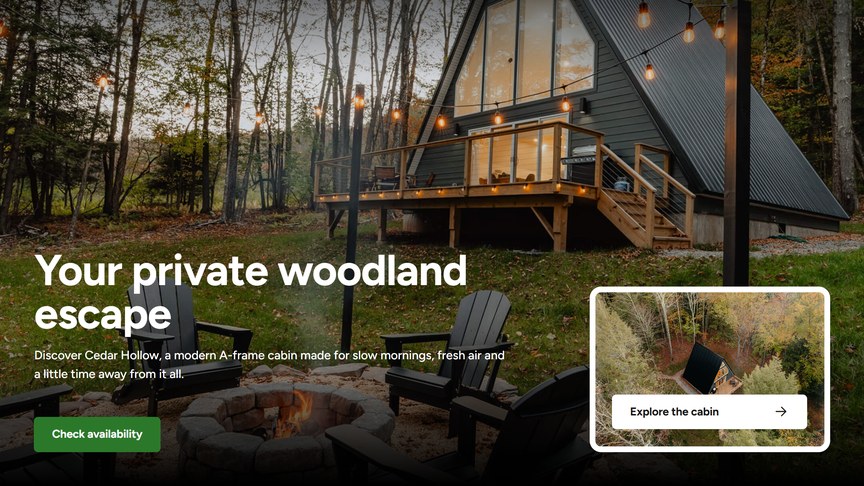
A full-width image or video at the top of a page, with a title, a text, up to two buttons and an optional box in the bottom corner: an image card, or the availability search of WP Booking System.
Content
Media Type: Image or Video.
For an image, the recommended size is 1920 × 1080 px (landscape). On phones the center of the image is shown, so keep the subject in the middle.
For a video, choose the Type:
- File: an MP4 or WebM uploaded to the Media Library. Keep it short and small (under about 10 MB) so the page loads quickly.
- YouTube / Vimeo: paste the link of the video in Video URL.
The video plays muted and on a loop, without player controls, like a moving photo.
Buttons
Up to two buttons. For each one, choose a page or paste a URL in Link (the link text becomes the button label, and you can tick “Open link in a new tab”) and pick a Style: Primary or Secondary. Buttons without a link are not shown.
Headings & Options
- Subtitle: a small line above the title.
- Title: the main heading of the page.
- Text: a short introduction under the title.
Corner Box
An optional box in the bottom corner of the banner:
- None: no box.
- Image Card: a small image with a button, e.g. a link to a special offer. Upload the CTA Image (recommended 636 × 428 px) and set the CTA Button link.
- Availability Search: the WP Booking System search form, where visitors pick their dates and see which accommodations are available. Requires WP Booking System and its Search add-on.
The Search Form Options of the Availability Search:
- Language: the language of the form. Auto uses the current language of the website.
- Selection Type: Date Range (check-in and check-out) or Single Day.
- Minimum Stay: the minimum number of nights a visitor can search for.
- Layout: show the results as a List or a Grid.
- Show Featured Image: show an image next to each result.
- Redirect URL: the page that shows the search results, a page with the WP Booking System Embed module set to Search Widget. Leave it empty to show the results inside the box.
When the Hero Banner is the first module on the page, the header becomes transparent and sits on top of the image, with the white version of your logo. See Header Options.
